
Lexvision LV600IP-BSWP · Operating Manual · 16 pages
Model LV600IP-BSWPEdition EN · 09 / 2026 · V1
Document No. LV600IP-EN-01
600 W LED Moving Head · Beam Spot Wash Profile · IP65

LV600IP-BSWP

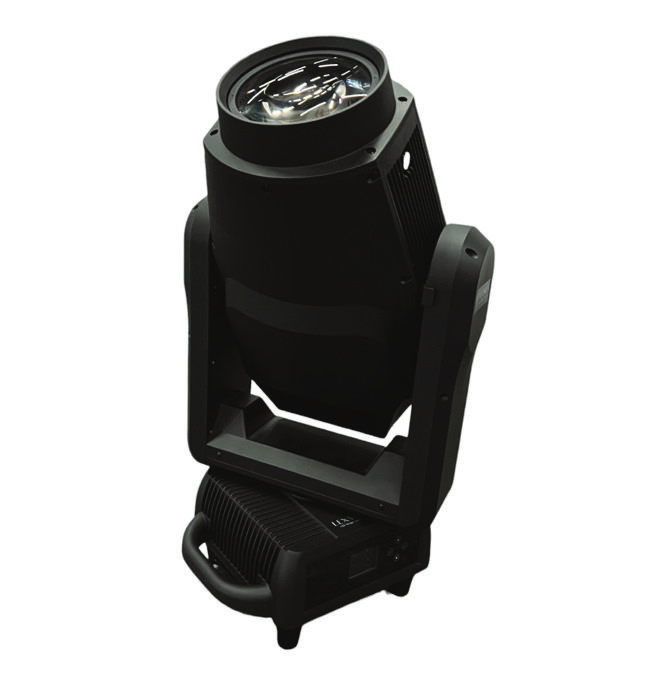
Weatherproof hybrid moving head with 600 W white LED, CMY + CTO, 4-blade framing system, animation wheel, rotating and static gobo wheel, two prisms and zoom 3° – 42°

Operating manual. Please read in full before first use and keep for future reference.
Light source
600 Wwhite LED module
Zoom
3° – 42°HD lens · autofocus
DMX
35 / 38 / 60RDM · Art-Net · sACN
IP rating
IP65indoor & outdoor

Foreword

00Welcome

Thank you for choosing the Lexvision LV600IP-BSWP — a weatherproof profile moving head with a 600 W LED, CMY colour mixing, framing system, animation wheel and extensive effects.

This document describes set-up, operation, care and troubleshooting of the fixture. Read the manual — in particular the chapter Safety Instructions — in full before first use and keep it with the fixture. This fixture is intended for professional use only. The warranty is void if damage results from improper use or non-compliance with this manual.

0.1Symbols used

WarningMarks situations in which persons may be injured or the fixture may be damaged. Always observe these instructions.
NoteMarks useful additional information, tips or explanations that aid understanding.
Danger — voltageMarks situations involving danger to life from electric current. Work on live parts is reserved for qualified personnel only.

0.2Package contents

0.3Unpacking & packing

Table of Contents

Overview

  1. 01Safety Instructions04
  2. 1.1General & electrical safety · operating limits04
  3. 1.2Mains connection, mounting & installation05
  4. 02Technical Specifications06
  5. 03Control Panel & Menu07
  6. 04DMX Cabling08
  7. 05DMX Channel Assignment (35 / 38 / 60 CH)09
  8. 06DMX Channel Specifications10
  9. 6.1Pan / tilt · strobe · dimmer · focus / zoom · CMY · colour wheels · colour macro10
  10. 6.2Gobo wheels · animation11
  11. 6.3Framing · prisms · frost · fixture control12
  12. 07Troubleshooting13
  13. 08Cleaning & Maintenance14
  14. Quick Reference Card15
  15. Manufacturer & CE Declaration of Conformity16

Chapter 01

01Safety Instructions

Read all safety information carefully before operating the fixture. Non-compliance may result in damage or injury. The protection rating is IP65.

1.1General safety

Electrical safetyCheck the voltage before installation — it must match the voltage indicated on the fixture (AC 200 – 240 V, 50 / 60 Hz). Overload protection and residual current protection (RCD) are required. Before powering on, verify that the fuse meets the technical requirements. Never replace the fuse without professional guidance and never short-circuit it; disconnect the power before replacing the fuse. The protective earth conductor (PE) must be properly connected.

1.2Operating limits

Max. ambient temperatureta = 40 °C
Max. surface temperaturetc = 79 °C
Distance to illuminated objects≥ 5 m
Distance to combustible material≥ 0.7 m
Minimum distance, continuous viewing≥ 3.5 m
Minimum distance between fixtures≥ 0.6 m
Hot surface · glare hazardDo not touch the fixture during operation — the surface temperature can reach up to 79 °C. Do not look directly into the light source without eye protection. Replace damaged protective shields immediately. Do not install the fixture directly on combustible materials.

1.3Mains connection

Input voltage and frequency must match the specifications on the fixture. When using multiple fixtures, it is recommended to switch each fixture on / off individually.

ConductorWire
L — liveBrown wire
N — neutralBlue wire
PE — protective earthYellow / green wire
Protective earthEnsure that the protective earth conductor (PE, yellow / green) is properly connected in accordance with applicable installation standards. If the external cable is damaged, do not replace it yourself — contact the manufacturer.

1.4Mounting

  1. Insert the G-clampInsert the G-clamp into the mounting hole of the fixture base, rotate the quick-lock plate into the slot and tighten securely.
  2. Second clampRepeat the procedure for the second G-clamp.
  3. Safety chainPass the safety chain through the handle of the fixture and secure it to the truss.
  4. Release the transport lockUnlock the pan/tilt transport protection lock before powering on.
Before each useInspect the G-clamp and safety chain for damage. The safety chain must pass through the handle of the fixture. Prolonged side-hanging is not recommended.

1.5Installation

Chapter 02

02Technical Specifications

Electrical

Mains voltageAC 200 – 240 V, 50 / 60 Hz
Power consumption850 W
Rated current4.25 A
Power factor≥ 0.98

Light source & optics

Type600 W white LED module (high brightness)
LED lifespan20,000 h
LensHD lens with anti-reflective coating
Zoom3° – 42°
Prisms1 × 3-facet linear, 1 × 6-facet circular; independent & overlapping, bidirectional, autofocus
Frost2 frost filters with high light output

Effects & movement

Dimmer0 – 100 % linear, 4 curves, 4 speeds
Strobe1 – 25 Hz, multiple effects
Pan / tilt540° / 270°, 16 bit
PositioningNon-contact magnetic encoders
Gobo sizeØ 22.8 mm · image Ø 12 mm · thickness 0.5 mm · metal / glass

Control

DMX channels38 (Basic) · 35 (Standard) · 60 (Extend)
ProtocolsDMX512, RDM, Art-Net, sACN, wireless (optional)
ConnectorsXLR-3 + XLR-5; RJ45 (optional)
Display2.4″ LCD, German / English, 180° rotatable
SensorsElectronic self-test, intelligent fan control
Eco modeStandby sleep mode

Framing · colour · gobo

Framing4 blades, precise positioning, frame rotation 360°, no image distortion
Colour mixingCMY continuous · high-saturation RGB · CTO 3,200 – 6,200 K linear
Colour filters9 (High CRI, Pink, Orange, Deep Blue, Green, Purple, Deep Red, CTO 3200 K, CTB 9000 K)
Static gobo12 gobos + open, bidirectional water-flow effect
AnimationCloud, fire and scrolling effects
Rotating gobo7 gobos + open, rotation, shake, scrolling, 16 bit

Mechanical

Dimensions389 × 389 × 678 mm
Net weight29 kg
IP ratingIP65

Chapter 03

03Control Panel & Menu

Controls

ControlFunction
LCD2.4″ display
UpSelect sub-menu cyclically upward / increase value
DownSelect sub-menu cyclically downward / decrease value
Left (Back)Return to parent menu
Right (Enter)Confirm selected value

Rear panel connectors

  • 3-pin XLR DMX input / output
  • 5-pin XLR DMX input / output
  • Pressure equalisation (air) valve
  • Power input / power output

3.1Menu overview

Main menuSub-menuOptions / function
AddressDMX512 Address001 – 512
Channel modeBasic (38 CH) · Standard (35 CH) · Extend (60 CH)
No-DMX modeHold DMX · Blackout
SpecificationPan invertOff · On
Tilt invertOff · On
PT encoderOff · On
PT speedFAST · NORMAL · SLOW
Dimmer curveCurve_CV1 · Line_CV2 · S_CV3 · SquareCV4
LED PWM1.2 kHz · 6 kHz · 12 kHz · 24 kHz · 25 kHz
Dimmer speedSpeed1 · Speed2 · Speed3 · Speed4
Fan modeTheater · Quiet · AUTO · HIGH
Display blackoutOff · On
Display invertOff · On
Key lockOff · On
LanguageEnglish · Chinese
Sleep modeOff · On
ManualChannels 1 – 34 · ResetControl all channels individually 000 – 255; fixture reset
InformationOperating hours · firmware · temperature · fan · RDM ID · errorsFixture hour / LED hour; versions, temperatures and fan speed (Panel, XY, DRV1 – DRV4); system errors
AdvancedFactory reset · reset operating hours · reset LED hours · calibrationService functions
TestAutomatic self-testYes · No

Chapter 04

04DMX Cabling

4.1DMX connection

The fixture uses 3-pin and 5-pin XLR connectors for DMX input and output.

Pin 1GND (ground)
Pin 2DMX − (data minus)
Pin 3DMX + (data plus)
TerminatorA terminator must be connected at the last fixture in the DMX chain: 120 Ω, ¼ W resistor between pin 2 and pin 3 of the DMX output.

4.2Cabling rules

4.3Daisy chain

Connect the DMX output of the controller to the DMX input of the first fixture, then the DMX output of the first fixture to the DMX input of the second, and so on. Plug the terminator into the DMX output of the last fixture.

Chapter 05

05DMX Channel Assignment

Three DMX modes: 38 channels (Basic), 35 channels (Standard) and 60 channels (Extend). The 60-CH mode adds 16-bit fine channels and speed channels.

383560Function
1311Pan
2322Pan fine
3333Tilt
4344Tilt fine
515Strobe
626Dimmer
737Dimmer fine
8298Focus
309Focus fine
92710Zoom
2811Zoom fine
10412Cyan
13Cyan fine
11514Magenta
15Magenta fine
12616Yellow
17Yellow fine
13718CTO
19CTO fine
1420Colour wheel 1
1521Colour wheel 2
1622Colour wheel 3
17823Colour macro
18924Gobo 1 wheel (rotating)
191025Gobo 1 rotation
1126Gobo 1 rotation fine
201227Fixed gobo (static)
212628Reserved
2229Animation
231330Animation rotation
31Animation rotation fine
383560Function
241432Framing blade 1A
33Framing blade 1A fine
251534Framing blade 1B
35Framing blade 1B fine
261636Framing blade 2A
37Framing blade 2A fine
271738Framing blade 2B
39Framing blade 2B fine
281840Framing blade 3A
41Framing blade 3A fine
291942Framing blade 3B
43Framing blade 3B fine
302044Framing blade 4A
45Framing blade 4A fine
312146Framing blade 4B
47Framing blade 4B fine
322248Framing rotation
49Framing rotation fine
3350Prism 1
24Prism (combined, 35 CH only)
342551Prism 1 rotation
3552Prism 2
3653Prism 2 rotation
372354Frost
55Frost fine
383556Fixture control
57Pan/tilt speed
58Colour speed
59Focus speed
60Gobo speed

Chapter 06

06DMX Channel Specifications

6.1Pan / tilt · strobe · dimmer · focus / zoom · CMY / CTO

383560FunctionDMX valueSetting
1 / 231 / 321 / 2Pan / pan fine0 – 255Pan 0° → 540° (16 bit)
3 / 433 / 343 / 4Tilt / tilt fine0 – 255Tilt 0° → 270° (16 bit)
515Strobe0 – 19Closed
20 – 49Open
50 – 200Strobe slow → fast
201 – 210Open
211 – 255Random strobe slow → fast
6 / 72 / 36 / 7Dimmer / dimmer fine0 – 255Closed → open (0 – 100 %)
8 / –29 / 308 / 9Focus / focus fine0 – 255Far → near
9 / –27 / 2810 / 11Zoom / zoom fine0 – 255Large → small
10412 (13)Cyan (fine)0 – 2550 – 100 %
11514 (15)Magenta (fine)0 – 2550 – 100 %
12616 (17)Yellow (fine)0 – 2550 – 100 %
13718 (19)CTO (fine)0 – 2550 – 100 %

6.2Colour wheels · colour macro

38 / 60ValueFunction
14 / 200 – 127Colour wheel 1: linear movement
128 – 170Colour 1
171 – 212Colour 2
213 – 255Colour 3
15 / 210 – 127Colour wheel 2: linear movement
128 – 170Colour 4
171 – 212Colour 5
213 – 255Colour 6
16 / 220 – 127Colour wheel 3: linear movement
128 – 170Colour 7
171 – 212Colour 8
213 – 255Colour 9
38 / 35 / 60ValueColour macro
17 / 8 / 230 – 10No effect
11 – 63Colour 1 – 9 (11–16 · 17–22 · 23–28 · 29–34 · 35–40 · 41–46 · 47–52 · 53–58 · 59–63)
64 – 95Colour wheel 1 rotation counter-clockwise
96 – 127Colour wheel 1 rotation clockwise
128 – 159Colour wheel 2 rotation counter-clockwise
160 – 191Colour wheel 2 rotation clockwise
192 – 223Colour wheel 3 rotation counter-clockwise
224 – 255Colour wheel 3 rotation clockwise
Colour filters: High CRI · Pink · Orange · Deep Blue · Green · Purple · Deep Red · CTO 3200 K · CTB 9000 K

6.3Gobo wheels · animation

Gobo 1 wheel (rotating) — CH 18 / 9 / 24

ValueFunction
0 – 10Open
11 – 71Gobo 1 – 7 (11–18 · 19–27 · 28–35 · 36–44 · 45–52 · 53–61 · 62–71)
72 – 127Gobo 1 – 7 shake, slow → fast
128 – 189Wheel rotation counter-clockwise, fast → slow
190 – 255Wheel rotation clockwise, slow → fast

Gobo 1 rotation — CH 19 / 10 / 25 (fine: – / 11 / 26)

ValueFunction
0 – 127Positioning: indexing 0 – 360°
128 – 190Rotation counter-clockwise, fast → slow
191 – 192Stop
193 – 255Rotation clockwise, slow → fast

Animation — CH 22 / – / 29 · rotation CH 23 / 13 / 30 (fine 31)

ValueFunction
0 – 10Animation: reserved
11 – 255Animation linear movement / insert
1 – 10Rotation: insert (35 CH only)
11 – 130Rotation clockwise, fast → slow
131 – 133Stop
134 – 255Rotation counter-clockwise, slow → fast

Fixed gobo (static) — CH 20 / 12 / 27

ValueFunctionValueShake
0 – 10Open56 – 61Gobo shake 1
11 – 13Gobo 162 – 67Gobo shake 2
14 – 17Gobo 268 – 73Gobo shake 3
18 – 21Gobo 374 – 79Gobo shake 4
22 – 25Gobo 480 – 85Gobo shake 5
26 – 28Gobo 586 – 91Gobo shake 6
29 – 32Gobo 692 – 97Gobo shake 7
33 – 36Gobo 798 – 103Gobo shake 8
37 – 40Gobo 8104 – 109Gobo shake 9
41 – 43Gobo 9110 – 115Gobo shake 10
44 – 47Gobo 10116 – 121Gobo shake 11
48 – 51Gobo 11122 – 127Gobo shake 12
52 – 55Gobo 12128 – 189Water flow CCW, fast → slow
190 – 255Water flow CW, slow → fast

Shake slow → fast in each case. Gobos: metal / glass, outer Ø 22.8 mm, image Ø 12 mm, thickness 0.5 mm — high-temperature glass or metal available.

6.4Framing · prisms · frost

Framing blades 1A – 4A (channels vary by mode, see chapter 05) control the position from outside to inside (DMX 0 – 255). Blades 1B – 4B control the tilt ± 35°.

Channel (38 / 35 / 60)ValueFunction
Framing rotation
32 / 22 / 48
0 – 160Rotation 0° → 360°
161 – 202Rotation counter-clockwise, fast → slow
203 – 243Rotation clockwise, slow → fast
244 – 255No effect
Prism 1
33 / – / 50
0 – 10Open
11 – 255Prism 1 insert
Prism 2
35 / – / 52
0 – 10Open
11 – 255Prism 2 insert
Prism rotation
34 & 36 / 25 / 51 & 53
0 – 127Positioning 0° → 360°
128 – 191Rotation counter-clockwise, fast → slow
192 – 255Rotation clockwise, slow → fast
Frost
37 / 23 / 54 (fine 55)
0 – 255Frost linear movement / insert
Channel (35 CH only)ValueFunction
Combined prism
CH 24
0 – 10Open
11 – 71Prism 1 insert (positioning)
72 – 133Prism 1 rotation
134 – 195Prism 2 (positioning)
196 – 255Prism 2 rotation

60 CH only: additional channels

CHValueFunction
570 – 255Pan/tilt speed, fast → slow
580 – 255Colour speed, fast → slow
590 – 255Focus speed, fast → slow
600 – 255Gobo speed, fast → slow

6.5Fixture control — CH 38 / 35 / 56

0 – 9No effect
10 – 14Fixture reset
15 – 29Settings reset
30 – 34Pan/tilt reset
35 – 49Reserved
50 – 74LED PWM: 1.2 kHz · 6 kHz · 12 kHz · 24 kHz · 25 kHz (5 steps each)
75 – 79Reserved
80 – 99Dimmer curve 1 · 2 · 3 · 4 (5 steps each)
100 – 104Fan: Theater mode
105 – 109Fan: Quiet mode
110 – 114Fan: AUTO mode
115 – 119Fan: HIGH mode · 120 – 255 reserved

Chapter 07

07Troubleshooting

7.1Fixture does not respond when powered on

#Check
1Check the power supply.
2Check whether the power switch is turned on.
3Check whether the fuse is burned.

7.2DMX control issues

#Check
1Is the display flickering? If yes: inspect the DMX connector and signal cable.
2Display not flickering but fixture does not respond to control commands: check the DMX address.
3DMX signal unstable: check the XLR connector and signal cable.
4Use another controller for testing.

7.3Mechanical problems

7.4Lamp flickers

Temperature protectionThe fixture features temperature protection. When overheating occurs, the LED module shuts off automatically. In this case: check the fan function, inspect the fan filter for contamination and only reset the fixture after troubleshooting by qualified professionals. Damage caused by clogged fans, excessive smoke or improper use is not covered by the warranty.

Chapter 08

08Cleaning & Maintenance

The lifespan of the fixture depends on the operating environment and regular maintenance.

Before openingAlways disconnect the power supply before opening the housing. Do not open the housing until the fixture has cooled down completely.

8.1Cleaning

  1. Blow away loose particlesRemove loose particles with compressed air first.
  2. Clean the opticsClean residues from centre to edge with distilled water and odourless tissue paper or a cotton cloth. Handle optical components gently to avoid damaging the surface coating.
  3. No harmful agentsDo not use harmful liquids or hard objects.
  4. Replace damaged lensesHave damaged lenses replaced immediately.

8.2Maintenance intervals

IntervalAction
WeeklyClean fan filters and lenses.
Semi-annuallyPerform complete maintenance.
Before each useInspect G-clamps, safety chain and mounting hardware for damage.

Appendix A

AQuick Reference Card

Tear out along the dashed line and keep at the desk or in the flight case.

TEAR OUT HERE
Quick Reference
LV600IP-BSWP · DMX Modes
38 CH — Basic
01–04
Pan / tilt + fine
05–07
Strobe · dimmer + fine
08–09
Focus · zoom
10–13
C · M · Y · CTO
14–17
Colour wheel 1–3 · macro
18–23
Gobo rot. · fixed gobo · animation
24–32
Framing 1A–4B · rotation
33–38
Prisms · frost · control
35 CH — Standard
01–03
Strobe · dimmer + fine
04–08
C · M · Y · CTO · macro
09–13
Gobo rot. + fine · fixed gobo · anim.
14–22
Framing 1A–4B · rotation
23–25
Frost · prism comb. · prism rot.
27–30
Zoom · focus + fine
31–34
Pan / tilt + fine
35
Fixture control
60 CH — Extend
01–11
P/T · strobe · dimmer · focus · zoom (16 bit)
12–19
CMY + CTO (16 bit)
20–31
Colour wheels · macro · gobos · animation
32–49
Framing 1A–4B + fine · rotation
50–56
Prisms · frost · control
57–60
Speed P/T · colour · focus · gobo
Start addresses (fixtures 1 – 4)
35 CH
1 · 36 · 71 · 106
38 CH
1 · 39 · 77 · 115
60 CH
1 · 61 · 121 · 181
Term.
120 Ω, ¼ W (pin 2–3)
Fixture control (values)
10–14
Fixture reset
30–34
Pan/tilt reset
50–74
PWM 1.2 / 6 / 12 / 24 / 25 kHz
80–99
Dimmer curve 1–4
100–119
Fan Theater / Quiet / Auto / High
Operating limits
ta / tc
40 °C / 79 °C
Objects
≥ 5 m
Combustible
≥ 0.7 m
Fixtures
≥ 0.6 m · 2 persons to carry
First aid — fault diagnosis
No light? → mains, switch & fuse
No DMX? → address + cable + 120 Ω
LED off? → over-temperature, fan filter
Before power-on: release pan/tilt lock!
Lexvision LV600IP-BSWP · Quick Reference · Edition EN 09/2026 · V1Full manual in the booklet

Appendix B

BManufacturer & Conformity

Manufacturer

Lexvision GmbH
Waldweg 26
54636 Sefferweich · Germany
HRB 44195
WEEE Reg. No. DE 51219209

Service & support

For technical questions, contact your authorised dealer or verkauf@lexvision.de · +49 (0) 651 14567727. Have the model designation (LV600IP-BSWP) and date of purchase ready.

EU Declaration of Conformity

The manufacturer declares under its sole responsibility that the Lexvision LV600IP-BSWP complies with the relevant EU harmonisation legislation (LVD 2014/35/EU, EMC 2014/30/EU, RoHS 2011/65/EU). The signed EU Declaration of Conformity is available as a separate document and can be requested from Lexvision GmbH.

Lexvision LV600IP-BSWP · Operating Manual · Edition EN 09/2026 · V1 · Document No. LV600IP-EN-01 · Subject to technical changes and errors.